Build Your First Faceless YouTube Channel With AI
💡 Camera-shy ho? Face aur voice dikhaye bina YouTube channel start karo!
A practical step-by-step guide to choosing a niche, generating scripts with ChatGPT, creating realistic voiceovers, editing videos, and monetizing your channel — without appearing on camera.
📥 Done-For-You Guide 📱 Read on Any Device 🔒 Secure Checkout

Real Channel Revenue & Monetization Proof
Actual dashboard analytics and earning screenshots from creators who built their faceless channels using our guide.
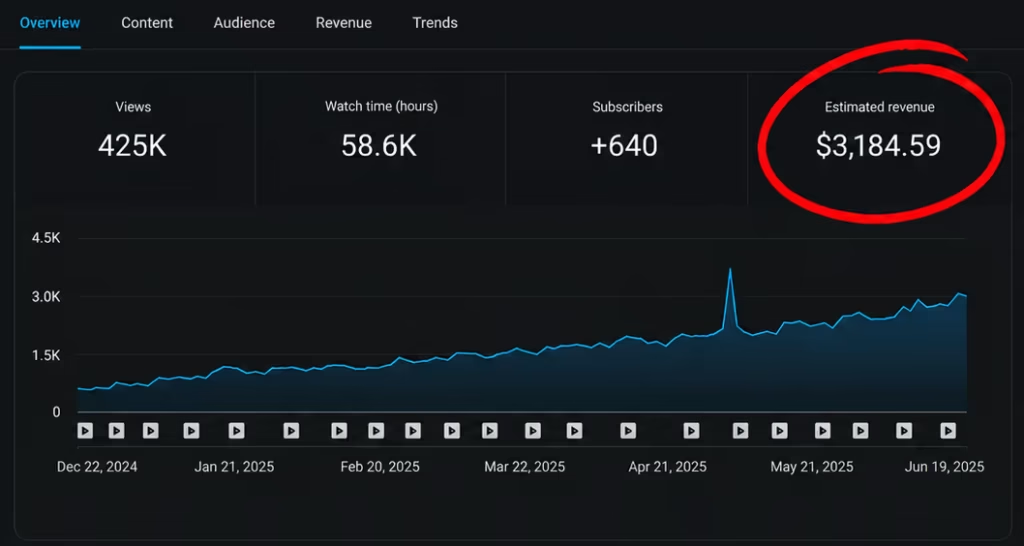
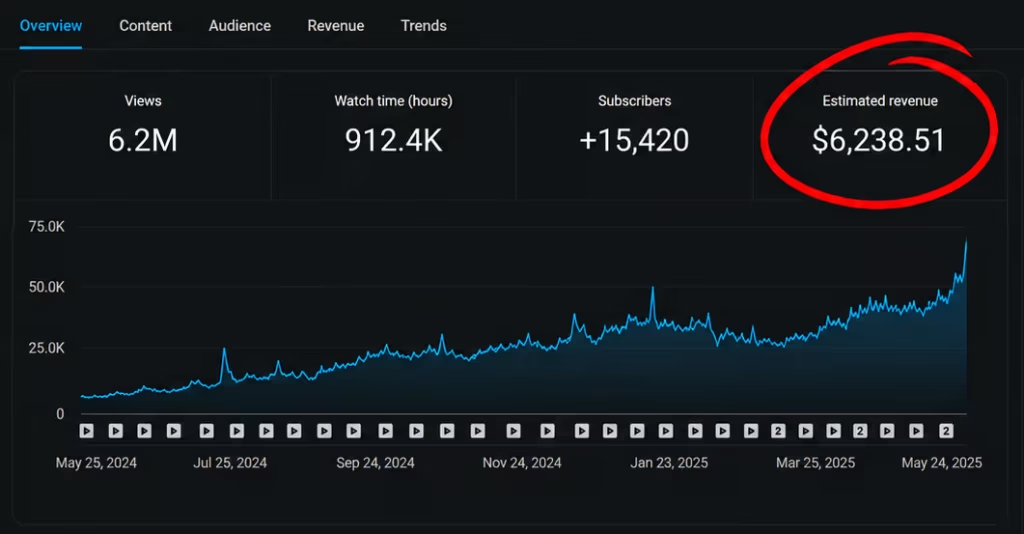
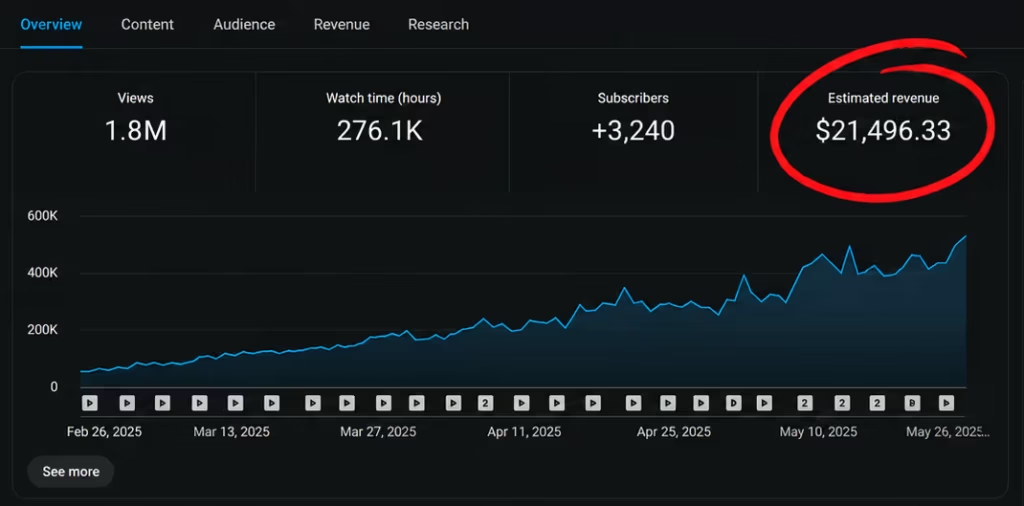
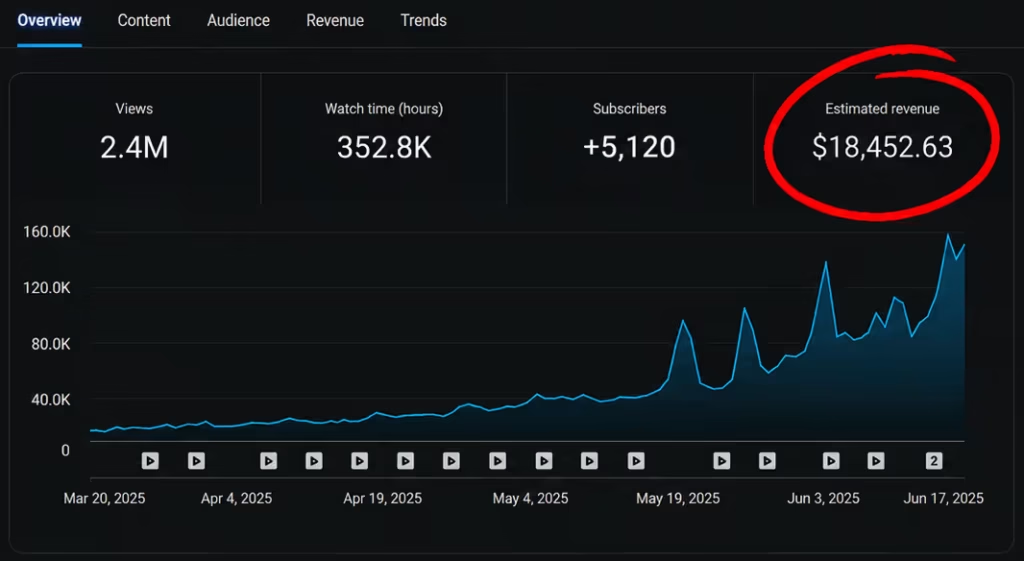
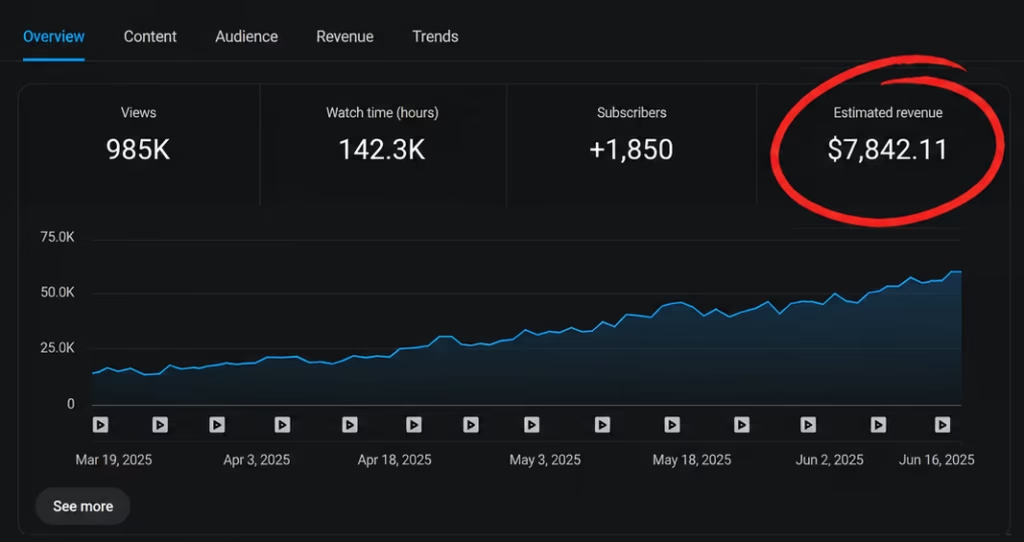
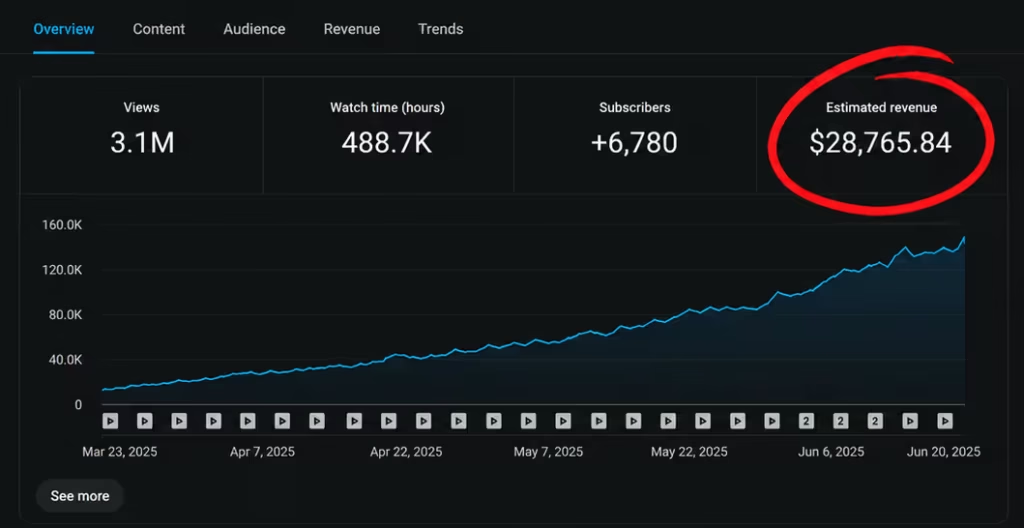
Real Channel Revenue & YouTube Channel
You want to start a YouTube channel, but hesitation and technical confusion keep holding you back:
Camera Hesitation
Camera facing is scary? Want to maintain 100% online privacy without showing your face or identity on video.
Voice & mic concerns
Apni voice recording se uncomfortable ho ya expensive studio microphones afford nahi kar sakte?
Editing & Scripting Overwhelm
Writing scripts and mastering complex editing tools like Premiere Pro takes hours without a clear template.
Niche & Topic Uncertainty
Konsa niche choose karein samajh nahi aata? Unsure which topics have high audience demand and monetization potential.
💡 The Practical Solution: You don’t need expensive camera gear or public speaking confidence. You need a structured, step-by-step faceless content production system.
Introducing the Faceless YouTube AI Guide
A comprehensive 10-chapter digital blueprint designed to help you plan, produce, and launch a faceless YouTube channel step by step.
10 In-Depth Guide Chapters
Step-by-step breakdown covering niche selection, scripting, voiceovers, editing, SEO, and monetization.
40 Proven Niche Case Studies
Real-world channel breakdowns with subscriber benchmarks, content styles, and earnings case studies for educational study.
ChatGPT Prompt Library
Includes 3 prompt methods (Lazy, Similar, Guided) and the Attention-Agitation-Activity-Action (AAAA) script framework.
30-Day Content Calendar
A printable monthly planning grid to organize your video concepts and maintain consistent uploads.
YouTube Video Planner
Pre-production planner worksheet covering video hooks, keyword tags, B-roll notes, and thumbnail titles.
40+ Recommended Tools Directory
Curated list of free stock video sites, AI voice generators, video editing apps, and copyright-free music sources.
What's Inside — 10 Detailed Chapters
A benefit-led walkthrough of every module included in your digital guide download.
Chapter 01 — Choosing Niche & Topics
Learn how to evaluate search demand, audience interest, and topic viability using vidIQ, TubeBuddy, and Key Tools paired with a business plan framework.
vidIQ • TubeBuddy • Business PlanChapter 02 — Generating Video Ideas
Discover data-driven and trend-driven research frameworks to brainstorm continuous video concepts using Google Trends and search data.
Google Trends • Search VolumeChapter 03 — Scriptwriting with ChatGPT
Master 3 prompt methods (Lazy Script, Similar Script, Guided Script) plus the Attention-Agitation-Activity-Action (AAAA) script blueprint.
ChatGPT Prompts • AAAA BlueprintChapter 04 — Human vs AI Voiceovers
Explore realistic AI voice generation options (ElevenLabs) vs human voice artists (Fiverr / Voices.com), quality checks, and YouTube monetization rules.
ElevenLabs • Fiverr • Monetization RulesChapter 05 — Video Production & Editing
Master editing workflows across Adobe Premiere, InVideo, CapCut, DaVinci Resolve and accessible AI video generator platforms.
CapCut • Premiere • InVideo • DaVinciChapter 06 — Thumbnails & Titles
Understand visual hierarchy, color contrast, curiosity hooks, and split-testing thumbnails using TubeBuddy A/B testing tools.
Contrast Design • TubeBuddy A/B TestChapter 07 — YouTube SEO & Discoverability
Understand algorithm discovery factors, title keyword placement, description tags, and metadata mapping for search indexing.
SEO Signals • Tag OptimizationChapter 08 — Content Scheduling & Batching
Build a repeatable batch production schedule to produce videos efficiently while avoiding over-automation and creator burnout.
Batch Production • Schedule WorkflowChapter 09 — Monetization Strategies
Explore 5 distinct monetization paths including AdSense parameters, affiliate marketing, brand sponsorships, channel memberships, and digital products.
AdSense • Affiliates • SponsorshipsChapter 10 — YouTube Analytics Deep Dive
Learn to read audience retention graphs, CTR metrics, and traffic sources to optimize future video performance and scale your channel.
Retention Curves • CTR AnalysisReal-World Faceless Channel Case Studies
Discover documented case-study benchmarks from successful third-party faceless channels featured inside the 40-Niches Bonus Guide.
Demonstrates top-down hands-only visual tutorials accompanied by background audio — zero face or voice required.
Uses custom map illustrations, archive images, and narrative voiceover to explain alternate historical scenarios.
Cinematic documentary mini-movies produced entirely with stock footage clips, motion graphics, and audio.
Explains complex civil engineering concepts using table-top physical models and clear voice narration.
Combines classical statue imagery, cinematic stock backgrounds, and voice narration to deliver wisdom.
Screen recording tutorials solving specific software tasks with step-by-step instructions.
What Creators Are Saying About The Workflow
Feedback from Indian creators and entrepreneurs who implemented our 10-chapter faceless YouTube guide.
"I always struggled with video scripting and spent hours trying to write intros. The AAAA blueprint and ChatGPT prompt methods in Chapter 3 gave me complete video scripts in under 10 minutes."
Aman Sharma
New Delhi • Content Creator"I was scared YouTube would demonetize my channel if I used AI voiceovers. Chapter 4 explained YouTube's exact policy rules and how to use ElevenLabs properly alongside custom editing."
Rohan Kulkarni
Mumbai • Tech Enthusiast"For ₹199, the bonus 40 niche case study list and free stock footage directory alone is worth 10x the price. Perfect for anyone who wants a faceless channel without showing their face on camera."
Priyanka Mehta
Bengaluru • Digital Creator3 Included Resources & Bonus Workflows
Practical templates, worksheets, and reference directories bundled inside your ₹199 digital download.
📅 Automated 30-Day Content Calendar
A ready-to-use planning template to organize video topics, script progress, voiceover assets, and upload schedules.
📝 YouTube Video Planner Worksheet
Pre-production planner worksheet covering title hooks, keyword tags, B-roll callouts, and thumbnail concepts.
🧰 40+ Creator Tools & Apps Directory
A curated resource list of free stock video repositories, AI voice tools, editing software, and copyright-free audio.
40+ Recommended Creator Tools & Software Directory
Stop wasting hours searching for reliable tools. Access a curated directory of vetted apps, software, and repositories to streamline every stage of production.
Free Stock Media & B-Roll Repositories
High-definition copyright-free video footage, archive photos, motion backgrounds, and vector illustrations.
AI Voice Generators & Audio Libraries
Hyper-realistic AI voiceover generators, YouTube-compliant background music libraries, and sound effect archives.
Video Editors & AI Automation Tools
Desktop video editors, AI video generators, auto-caption generators, and motion graphic software.
YouTube SEO & Thumbnail Design Suites
Search volume keyword research tools, thumbnail A/B split testing tools, and high-contrast design suites.
🧰 Full Directory Included Free With Your ₹199 Order
Every tool is categorized with direct access links, free-tier limits, and usage recommendations inside the guide.
Who This Guide Is For vs Not For
We want to ensure this digital guide aligns with your expectations before you purchase.
✓ Who This Guide IS For:
-
✓Camera-Shy Creators: You want full privacy without revealing your face online.
-
✓Voice-Hesitant Beginners: You want clear guidance on AI voiceovers vs human narration.
-
✓Busy Professionals & Students: You need a weekend batch production system to manage your time.
-
✓Action-Oriented Beginners: You are ready to follow a structured, step-by-step workflow.
✕ Who This Guide IS NOT For:
-
✕Get-Rich-Quick Seekers: Anyone looking for magic buttons or instant income promises.
-
✕Zero-Effort Buyers: People unwilling to write scripts, edit media, or post consistently.
-
✕Blackhat Automation Tricks: Anyone seeking fake view bots or policy-violating software.
Build Your Faceless YouTube Workflow With AI
Everything you need to plan, produce, and launch your faceless channel.
Instant Digital Download • One-Time Access
Build Your Faceless YouTube Workflow With AI
Everything you need to plan, produce, and launch your faceless channel.
Instant Digital Download • One-Time Access
Frequently Asked Questions
Honest answers to common questions before you purchase.
No. The guide focuses 100% on faceless content formats where you create videos using stock footage, screen recordings, illustrations, or B-roll without appearing on camera.
No. The guide covers accessible tools and free software options (like CapCut, Pexels, and free voice tools) so you can start with a basic computer setup.
Chapter 04 provides a detailed breakdown of YouTube’s AI content policies. It explains how high-quality AI voices (like ElevenLabs) combined with original scripting and high-value editing stay compliant, as well as when to consider human narration on Fiverr.
Yes. The guide starts from scratch and walks you step-by-step through niche selection, scripting, editing, and channel optimization.
YouTube performance depends on your niche choice, content quality, upload consistency, and audience demand. The guide provides practical workflows to maintain consistency, but does not promise artificial timelines or guaranteed numbers.
You get instant digital download access to the 10-chapter PDF guide, 40+ niche case studies, ChatGPT prompt templates, 30-day content calendar, video planner, and tools directory.